
3.5. Contributing
This section describes the appropriate procedures for reporting bugs and suggesting improvements and contributing changes. It also describes the branching model used in the repository and specifies how maintainers can create releases.
Thank you in advance for your contributions to this project. 🙂
Reporting bugs and suggesting improvements
If you found a bug in BDUS, please let us know by creating an issue on GitHub’s issue tracking system.
Try to tell us how to reproduce the bug, and make sure to mention the version of BDUS that you are using (run bdus version).
Similarly, feel free to create issues suggesting improvements or proposing new features.
Contributing changes
Anyone can contribute changes to BDUS by creating pull requests on GitHub. If you are contributing non-trivial changes, remember to update the Unreleased entry (create it if it doesn’t exist) of the Version history section accordingly.
Branching model
Here we describe the branching model used in BDUS’ repository. See also the Versioning scheme section.
Branching and tagging
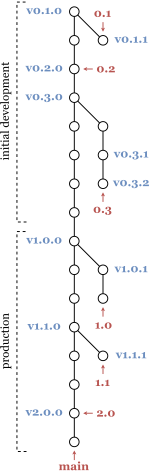
Branch main corresponds to the latest usable, development version of the project, and must always pass all tests. Other branches may be created to work on new features or fixes, and all modifications must be done in such a branch and pass all tests before being integrated into main.
Releases with patch version 0 correspond to commits in branch main and are marked by annotated tags.
For version 1.2.0, for instance, the release commit message must be Release 1.2.0, the annotated tag on that commit must be named v1.2.0, and the tag message must be Release 1.2.0.
If a release with non-zero patch version is created, say 1.2.1, it must correspond to a commit in a branch named 1.2 that diverges from main at the commit corresponding to the 1.2.0 release, and must also be tagged with the release’s version number (prefixed by v).
This branching model is depicted in the figure above or to the right, where tags are displayed in blue and branches in red. Note that this model applies to both the initial development and production stages.
Tags must not be deleted or altered, and no release branches should ever be deleted or force-pushed to. GitHub releases should not be created (mostly because the “latest release” label is applied to the most recently created release, not to the one with the highest version).
Creating releases
Maintainers must follow this procedure to create new releases:
Ensure that the versioning scheme is respected (including that undefined behavior is not made well-defined from one release to a backward compatible other).
Do a global find for all occurrences of
TODO, ensuring that no TODO items apply to the new release.Add an entry for the new release in the Version history with all relevant changes since the release from which the new one descends (which should already exist in an “Unreleased” entry).
Update occurrences of the current version:
README.md: Update all the hrefs.
README.md: Update the version badge.
kbdus/include/kbdus.h: Update theKBDUS_HEADER_VERSION_…macros.
libbdus/include/bdus.h: Update theBDUS_HEADER_VERSION_…macros.
Do a global find for all occurrences of the current version in the whole repository. Update them where applicable and add them to this procedure if they are not enumerated in the list above.
Create commit with these changes and message
Release x.y.zfor new version number x.y.z in some branch other than main.Ensure that all Github Actions passed.
Fast-forward merge the new commit into main and push.
Create an annotated tag on the new commit with name
vx.y.zand messageRelease x.y.zfor new version number x.y.z and push the tag.Ensure that the Read the Docs documentation build succeeded. Ensure that the new version is “active” (i.e., shows up in the version selection menu). Remove old versions of the documentation (by making them inactive) if deemed appropriate.